Blox Fruits Trading Guide: Everything You Need to Know
Published February 13, 2026 · Blox Fruits Trade Hub
A complete guide to trading in Blox Fruits — how it works, the rules and limits, what items you can trade, tips for getting the best deals, and how to avoid scams.
## What Is Trading?
Trading is one of the most important features in Blox Fruits. It lets players exchange fruits, gamepasses, and scrolls with each other — and it's the **only way** to get certain items that are no longer available in the game.
Trading was introduced in **Update 15** and has been refined over several major patches since then. Whether you're a brand-new player trying to figure out how it all works or an experienced trader looking to sharpen your strategy, this guide covers everything you need to know.
---
## How Trading Works
To start a trade, you need to find a **trading table**. These are located at the **Café** in the Second Sea and the **Mansion** in the Third Sea — you won't find any in the First Sea, so you'll need to progress before you can trade.
Here's the step-by-step process:
1. **Sit down** at one side of a trading table
2. **Wait** for another player to sit on the opposite side
3. A **trading menu** pops up showing your stored inventory
4. Both players select the items they want to offer
5. Both players **confirm** the trade
6. Items are exchanged instantly
<div class="info-box">
Once the player sits down, they need a different player to sit on the opposite side. Once both players are seated, a pop-up menu will appear.
</div>
<div class="image-box">

</div>
<div class="info-box">
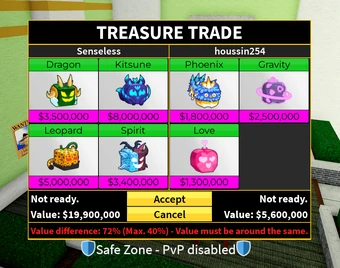
Here the player should see their stored **Blox Fruits** and **gamepasses** bought. If one of the traders (or both) has already done five trades, the pop-up menu will not appear.
</div>
<div class="image-box">
</div>
---
## Trading Rules & Limits
Blox Fruits has several built-in limits to keep trading balanced and reduce scams:
- **5 trades per 8 hours** — Once you hit the cap, wait for the cooldown to reset
- **4 items max per trade** — Each side can put up to 4 items in a single trade
- **40% value difference cap** — The game blocks trades with a massive value gap. Adding Robux-purchased products can push the threshold up to 80–100%
- **One of each fruit** — You can only store one copy of each fruit type unless you buy the +1 Fruit Storage pass (400 Robux)
- **No duplicates of permanent items** — You can't receive a permanent fruit or gamepass you already own
---
## What Can You Trade?
### Fruits
Regular Blox Fruits from your inventory. These are the bread and butter of trading. You need to **store** a fruit before you can trade it — you can't trade your currently equipped fruit directly.
### Gamepasses
Gamepasses purchased from the Roblox game page (like **Dark Blade**, **+1 Fruit Storage**, **2x Money**, etc.) can be traded after you store them.
### Permanent Fruits
Since **Update 17.3**, permanent fruits can be stored and traded. These are extremely valuable because they cost Robux and give permanent access to a fruit.
### Scrolls
Various scrolls that provide buffs or abilities can also be included in trades.
---
## Where Should You Trade?
Trading tables are only available in the **Second Sea** (Café) and **Third Sea** (Mansion).
If you have access to the Third Sea, **trade there**. Here's why:
- The Third Sea Mansion has an **extra seat**, giving more opportunities
- Players there have been playing longer and have better inventories
- You'll find more valuable items on offer and generally fairer deals
---
## Trading Tips & Strategy
### Know Your Values
The single most important thing in trading is understanding what items are actually worth. In-game prices set by the developers **don't reflect real trading value** — supply, demand, and community trends all play a role.
Use a value tracker (like [our Values page](/values)) to stay updated on current market prices before every trade.
### Watch the Trends
- **Rising items** — hold onto them, their value is climbing
- **Falling items** — trade them sooner rather than later before they drop more
- **Stable items** — no rush, take your time finding the right deal
### Demand > Value
An item with **high demand** (8–10/10) will be much easier to trade than a higher-value item with low demand. Sometimes it's smarter to trade a high-value, low-demand item for a slightly lower-value item that everyone wants.
### Bundle Low-Demand Items
Have items that aren't moving? Bundle 2–3 lower items together to sweeten a deal.
### The Permanent Multiplier
Permanent versions of fruits are always worth significantly more than their regular counterparts — typically **2x to 5x** the regular value.
### Be Patient
Good trades don't happen instantly. If you know your item's value, **wait for the right offer** rather than settling for a bad deal out of impatience.
---
## Staying Safe: Avoiding Scams
### Freeze Trade
Some scammers use bugs to **freeze the trading interface**, preventing you from cancelling.
### Auto Accept
A cheat that **forces you to accept** a trade automatically. Always double-check what's in the trade window before confirming.
### Value Manipulation
Scammers try to convince you an item is worth less (or more) than it actually is. **Always verify values independently**.
### Last-Second Swap
A trader removes their good item and replaces it with something worse **right before you confirm**. Always review the final offer carefully.
---
## Change History
| Update | Change |
|--------|--------|
| **Update 15** | Trading was first introduced |
| **Update 17.3** | Players can now store and trade permanent fruits |
| **Update 18** | Trading soundtrack temporarily removed |
| **Update 23** | Trading soundtrack re-added |
---
## Ready to Trade?
Put your knowledge to work! Head to our [Trade Marketplace](/trading) to post your own trade ads or browse what other players are offering. Use the [Trade Calculator](/calculator) to check if a deal is fair before committing, or check the [Values page](/values) to look up current prices.